OnePrime Website Proposal

What I See

The draft you shared looks like a firm that invests in technology, and it keeps every fact from today's site, including all 24 IPOs and acquisitions, the ten bios and the $500M+ invested since 2017. It's a good starting point, and I'll treat it as one of the design options.

The bigger problem is that people don't find OnePrime. On November 10, Google didn't show the homepage when I searched "oneprime capital."

I asked ChatGPT, Perplexity and Gemini five questions a seller would ask, such as "which firms provide founder liquidity through secondary sales?"

Across 15 answers OnePrime was named once.

Industry Ventures, StepStone, Forge and EquityZen were each named 7 times.

Part of the cause is the site's settings and missing pages. The rest is off the site, on the directories and roundups AI tools read.

This proposal covers the new design, the search and AI work, keeping the site safe, and keeping all of it current after launch.

What You Get

The New Site

  • Three design directions, one of them built on the draft you shared, each with every fact from today's site carried over.
  • You pick one, and I build it as a working site.
  • Before launch, I go through every page with your team and bring it up to date: people, exits, Fund III and news.
  • Each page gets its own address, which is what Google needs to read it, so the draft (a single file made in ChatGPT) is rebuilt rather than copied.
  • The team, exits and news are set up so anyone on your team can add a person, an exit or a post without touching the design.
  • Any page whose address changes gets a redirect, so links from the 2,000+ sites that point to OnePrime today keep working.
  • The SEC disclaimer goes back to its original wording.

Getting Found

  • The settings Google needs: a sitemap, one main address, a robots.txt that points to the sitemap, Google Search Console, and the firm's details in the format Google uses for its company panel.
  • Six pages that answer a seller's questions: founder share sales, employee liquidity, tender offers, LP interest sales, structured secondaries, and how a OnePrime deal works step by step. Each opens with a plain two-sentence answer, which is the part Google and AI tools quote. I write them, and each one goes live only after your sign-off.
  • News in the main menu, with the Fund III close and each exit as its own post. AI tools now list 2026 fund closes when asked who raised over $300 million recently, and a July 2025 close no longer comes up.
  • Corrected OnePrime profiles on the data sites AI tools pull from, and a pitch to each directory and roundup where OnePrime is missing.

Monthly Care

  • Every update you send me (a new hire, an exit, a fund close, a bio change) goes live after your sign-off.
  • Each month I rerun the AI questions and the Google check, and you get a one-page report of where OnePrime shows up and what changed.
  • Outreach to the directories and roundups continues until OnePrime is on them.
  • Platform upkeep, backups, and a dated copy of each published version for your records.
  • A weekly security check of the site, with anything it finds fixed and checked again.

The Design Options

Each option is a working homepage and Team page. Open any of them and click through.

Option 1

Starts from the draft you shared
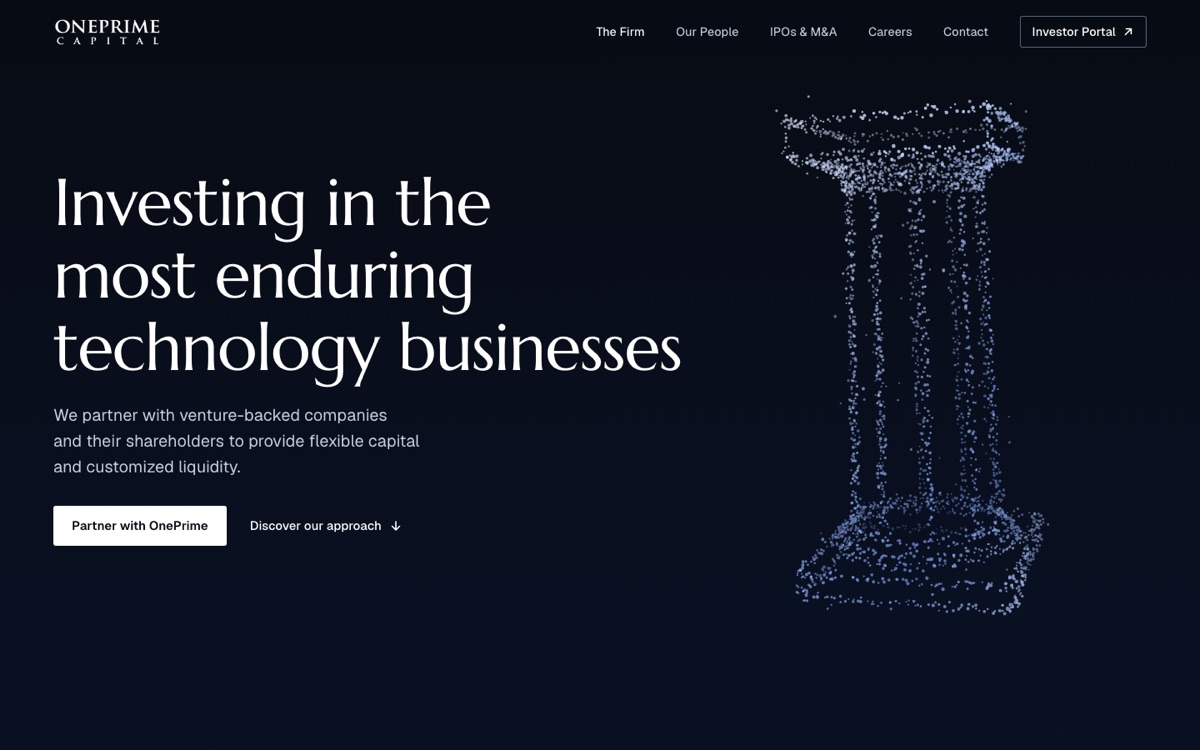
Option 1, the top of the homepage. The headline on the left, a classical column drawn in points of light on the right, on near-black.

It keeps the draft's dark look. A classical column drawn in points of light stands beside the headline and leans toward the pointer. Below it come the six areas of investment, the 24 exits by year as company marks, who the firm is, and the approach.

On the Team page the column regroups each time a visitor picks Founders, Employees, Investors or Companies.

Why This Design

The column stands for "enduring", the word in your headline that names what you look for. Its Roman shape matches the capitals of the OnePrime wordmark.

Opens on
The headline beside one moving drawing
Homepage sections
Areas of Investment, Investments, Who we are, Unique Approach, contact
Team page
Who the firm works with, then Meet the Team
Still to do
Careers and Contact pages, phone check, your review
Option 2

The track record first

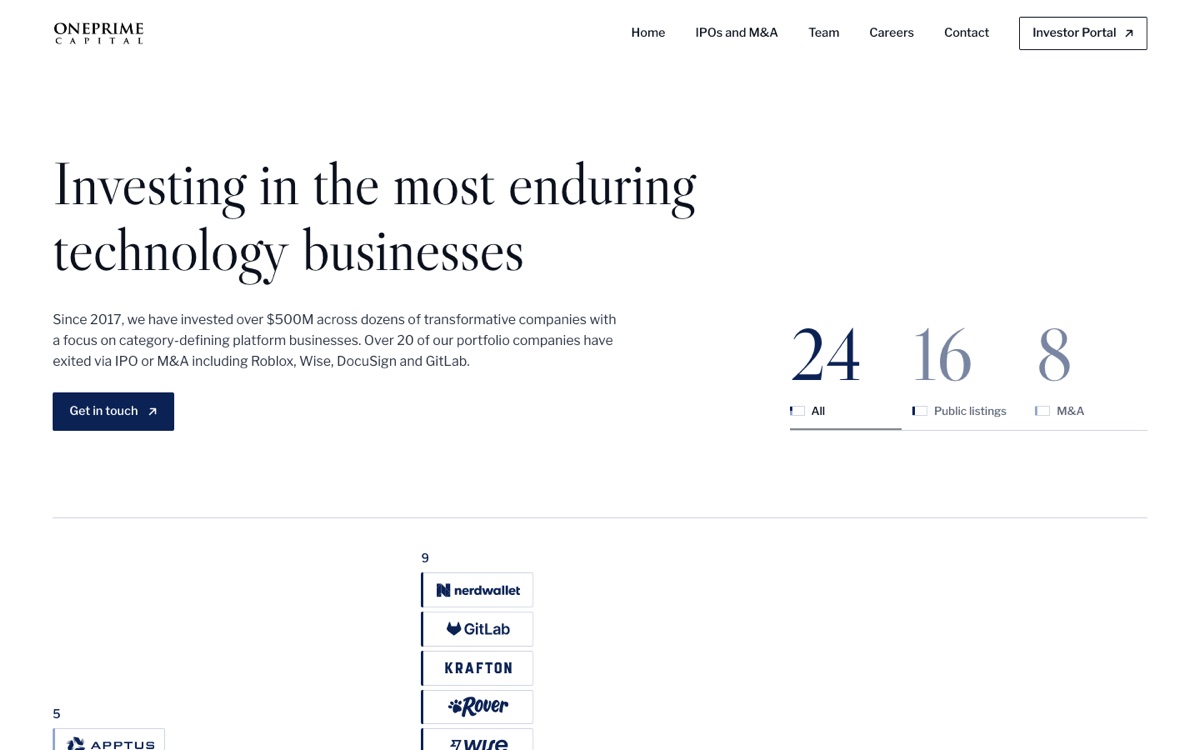
Option 2, the top of the homepage. The headline in black on white, the counts 24, 16 and 8, and the exits by year as company logos.

The 24 IPOs and acquisitions sit right under the headline as a chart by year, one block per company with its logo. Click one to see its exit, date and ticker or buyer. The same 24 follow as a list that sorts three ways. White with one strong blue.

On the Team page the chosen word sets very large in blue, and the ten people follow in black and white until you point at one.

Why This Design

The record is the firm's strongest proof, so it comes before any claim. The list gives Google and AI tools all 24 company names as text, which a logo alone does not.

Opens on
The exits by year, as logos
Homepage sections
IPOs and M&A list, Areas of Investment, Who we are, Unique Approach, contact
Team page
Who the firm works with, then Meet the Team
Still to do
Careers and Contact pages, phone check, your review
Option 3

A San Francisco film under the headline

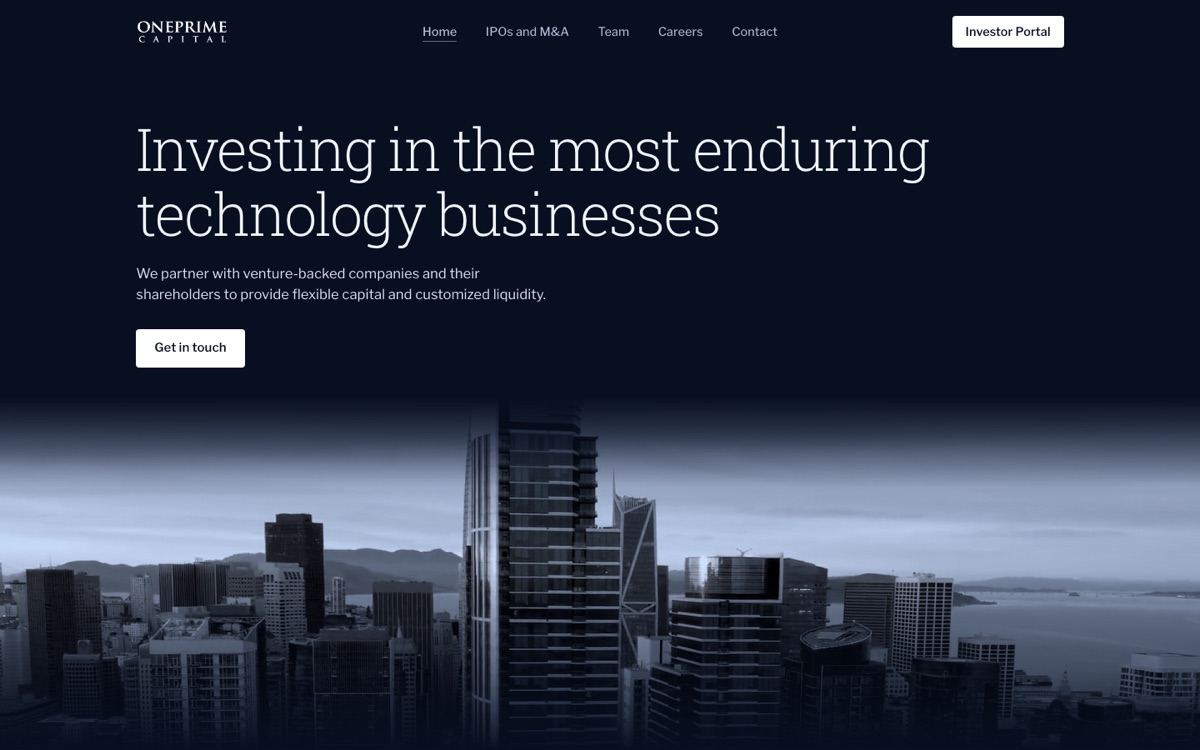
Option 3, the top of the homepage. The headline on deep navy over an aerial film of downtown San Francisco toned blue.

The page opens on deep navy with a slow aerial film of downtown San Francisco under the headline, toned to OnePrime's blues. A second version uses the Golden Gate Bridge coming out of the fog, and only the film changes. Pick a year to see the companies that listed or were acquired that year. Every page closes with the film showing through the firm's logo.

The Team page opens on the same navy, with the ten people after it.

Why This Design

It places the firm in the Bay Area before a word is read. The films are licensed footage, graded to the brand blues so they read as part of the page.

Opens on
The headline over a film of San Francisco, towers or Golden Gate
Homepage sections
IPOs and M&A by year, Areas of Investment, Unique Approach, Who we are, contact
Team page
Who the firm works with, then Meet the Team
Still to do
Careers and Contact pages, phone check, your review

The Search and AI Plan

The work runs in this order. The first step is the fastest, and the second is the one that changes what AI tools say about OnePrime.

  1. Fix the settings that keep the homepage out of Google

    A sitemap, one main address, a robots.txt that points to the sitemap, and Google Search Console, which reports why the homepage dropped out. The small fixes go in at the same time, with shorter page descriptions, text on every image, and the leftover "post" headings removed from the news pages.

    How you'll knowA search for "oneprime capital" shows your homepage first, and Search Console lists it as indexed.

  2. Get OnePrime onto the lists AI tools read

    When a founder asks ChatGPT who buys late-stage shares, the answer comes from a handful of directories and roundups. VentureCapital.Gold, Practical Venture Capital, Dakota and Nodem each name your competitors and leave OnePrime out. I pitch each one with a short description of the firm and Fund III. I also ask PEI, NFX Signal, Tracxn and PitchBook to correct profiles that call OnePrime a buyout fund, place it in New York, or stop at 2021.

    How you'll knowEach listing either appears or gets a no, and you see the tracker every month.

  3. Publish six answer pages

    One page for each question a seller asks, each opening with a plain two-sentence answer. The Milestones page also gets each company's name, year and exit type as text. Today it is mostly logos, and search engines and AI tools read almost nothing in a logo.

    How you'll knowEach page shows up in Search Console, then starts appearing as a source when the questions are asked again.

  4. Announce every close and exit

    Each fund close, notable exit and senior hire goes up as its own news post and goes to the directories above. AI tools list the newest fund closes first, so news is what keeps OnePrime in the answer to "who has raised recently."

    How you'll knowThe latest close appears when AI tools are asked who raised over $300 million recently.

  5. Measure the same things every month

    The same 15 AI questions, the same Google searches, and the same data pull, so every month is compared with the day this started.

Keeping the Site Safe

LPs, founders and their lawyers act on what OnePrime's site tells them. A copied page or a link that points somewhere else is a common way scams aimed at fund investors start, and for an SEC-registered adviser the site is also part of the compliance record.

I checked today's site on November 17. It has two of the six standard browser protections, and OnePrime's email is already hard to fake.

In Place Today

  • Every visit is encrypted, and browsers are told to always use the secure address.
  • Browsers are told not to guess at file types, which closes one way of disguising a harmful file.
  • Mail that pretends to come from oneprimecapital.com is sent to spam.

Missing Today

  • Framing protection. Any other site can show OnePrime's real pages inside its own, a setup used to trick visitors into clicking something they can't see.
  • A content policy. Nothing tells the browser which scripts the site may run, so a script slipped onto a page would run for every visitor.
  • A referrer policy. When a visitor follows a link off the site, the address of the page they were on goes with them.
  • A permissions policy. Nothing rules out a page asking for a visitor's camera, microphone or location, which this site never needs.

The new site launches with all six in place. Before launch, and every week after, the site is checked from the outside, the way someone looking for a way in would see it.

  • Anything left open

    Passwords, keys, private files or old pages that anyone on the internet could reach.

  • Copying and framing

    The browser protections that stop another site from showing OnePrime's pages inside its own to trick a visitor.

  • The secure connection

    That every visit is encrypted and the security certificate never lapses.

  • Where the domain points

    That the settings sending OnePrime's website and email traffic haven't been changed.

Anything the check finds is fixed, then checked again. Each month's report says what was checked and what changed, with a dated copy for your records.

Where the Site Lives

Option Cost per month Who can edit What to know
Webflow (today)
Cost per month$25 to $39
Who can editYour team, in a visual editor
What to knowNothing to move. Webflow's own price as of May 2026.
Framer
Cost per month$30
Who can editYour team, in a visual editor
What to knowSimilar to Webflow, and the whole site moves, with every address redirected.
WordPress
Cost per monthAbout $25 to $50, managed
Who can editYour team
What to knowNeeds plugin and security updates every month.
Self-hosted code
Cost per monthFree to $20
Who can editAnyone on your team with a Claude account
What to knowFastest and cheapest to run. There is no visual editor, so a change is described in plain words and Claude makes it.

Every option above handles the search and AI work the same way. The choice comes down to cost and how your team would rather make changes.

Fee

$5,500 one time for the new site and the Getting Found work, then $500 a month for Monthly Care, starting at launch. Whichever platform you choose bills OnePrime directly.

One Question

Who on your team will add news, exits and bios after launch, or would you rather send those to me?

Next Steps

A 30-minute call to walk through the design options and this proposal.